See Glasses Glare Removal in Action
Drag the divider or tap Before and After to inspect the eyes, glasses, and surrounding details.
These existing examples come from our sister site RemoveGlassesGlare.com. They are not new MomentRescue test results. Results vary by photo.
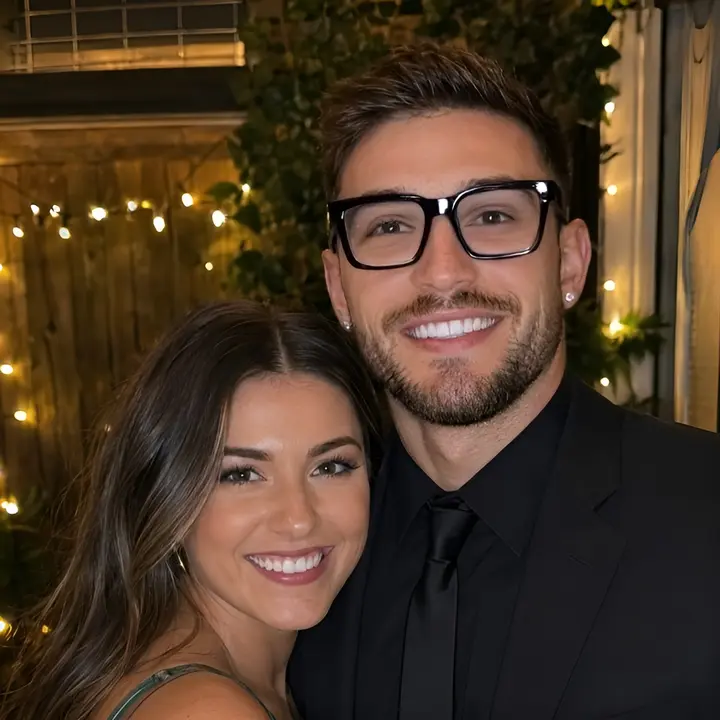
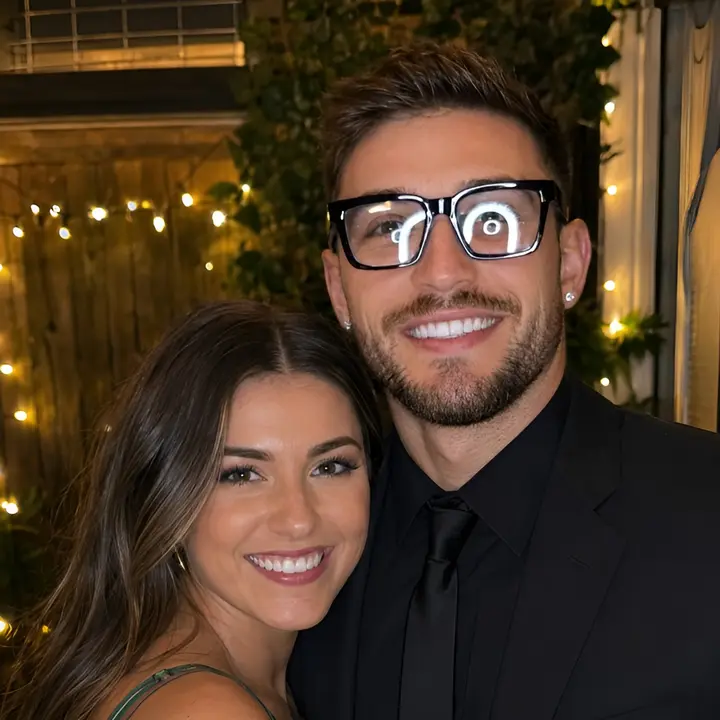 BeforeAfter
Glasses Glare · Groups
Ring light reflections
Circular reflections obscure the eyes in this two-person portrait.

 BeforeAfter
Glasses Glare · Portraits
Bright glare in a close-up
A close-up view of bright reflections across the lenses.
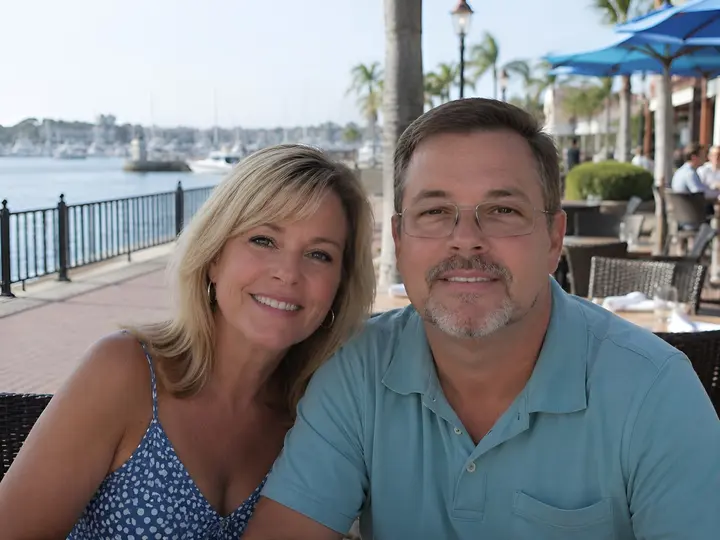
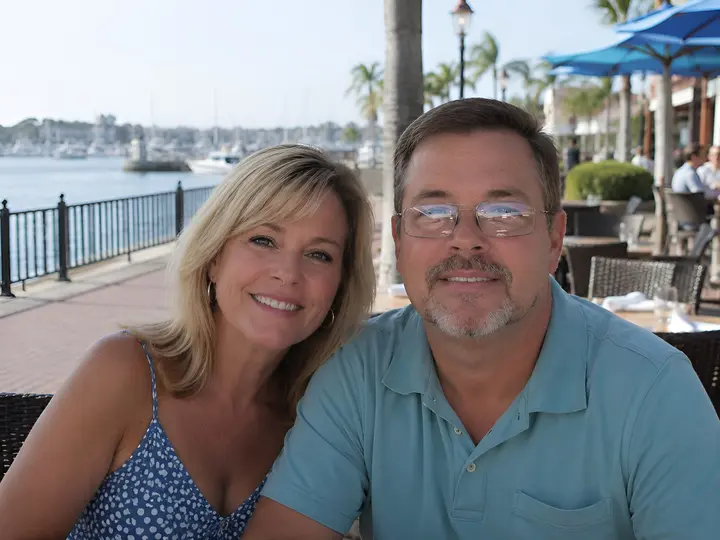 BeforeAfter
Glasses Glare · Groups
Reflections in an outdoor portrait
Lens reflections on the person wearing glasses in an outdoor photo.
How to Remove Glare from Glasses in a Photo
Upload your photo.
Upload the photo with glasses glare. Start with the clearest original you have.
Choose the person with glasses glare.
Select one person to repair. You do not need a reference photo to start.
Let MomentRescue reduce the reflections.
Sign in, confirm permission to edit the photo, and use 1 Rescue Credit to start the repair.
Compare and download the result.
Check both eyes and the glasses frame in Before / After, then download. If needed, use the one included correction to try again or add a clear reference photo of the same person.
For other editing methods, read how to remove glare from glasses in a photo.
When Should You Add a Reference Photo?
A single photo may be enough for mild or moderate glare. When reflections cover the eyes, a clear reference photo of the same person provides real visual guidance.
Choose a clear face with visible eyes, no severe lens glare, and preferably a similar head angle. If the first result needs work, use your included correction to add that reference or try again.
What Types of Glasses Glare Can Be Repaired?
Window reflections, screen reflections, flash glare, bright lens reflections, and colored reflections can be candidates for repair. This glasses glare remover cannot guarantee success with every photo; the amount of visible eye detail matters.
When Glasses Glare Is Hard to Repair
If glare completely hides the eyes, AI may not know exactly what the person’s eyes looked like. A clear reference photo of the same person can provide better visual guidance.
Large glare coverage, small faces, low resolution, steep head angles, thick frames, and limited eye visibility make repair harder. A blurry reference or a very different angle may also limit the result.
What is glasses glare?
Glasses glare is light reflected from eyeglass lenses, often caused by windows, screens, flash, or strong lighting. In photos, the reflection can partially or completely hide the eyes.
Can AI remove glasses glare?
AI can reduce reflections and reconstruct details in the affected lens area. Results are easier when some eye detail remains visible; when glare fully hides the eyes, a clear reference photo of the same person can provide better visual guidance. Reconstructed details are not guaranteed to match the original eyes.
What is MomentRescue?
MomentRescue is an online photo rescue toolkit designed to repair small flaws in photos that are difficult or impossible to retake.
Our current tools are Open Eyes and Remove Glasses Glare. Explore the photo repair tools or see shared Rescue Credit pricing.
New accounts receive one free Rescue Credit shared across tools. Each initial repair costs 1 Rescue Credit. No subscription is required. Your original photo and result are saved privately to your account for 30 days; only face crops are sent to the AI provider. Read our Privacy Policy.
Glasses Glare Removal FAQ
Can AI remove glare from glasses in a photo?
AI can reduce lens reflections in many photos, but results vary. If glare hides the eyes, generated details may not match the person’s real eyes.
How do I remove glasses glare from a photo?
Upload your photo, choose the person with glasses glare, and start the repair. Compare both eyes and the frame before downloading.
Can I remove glare from glasses online?
Yes. MomentRescue works in your browser without installing an editor. New accounts receive one free Rescue Credit shared across tools; further repairs use paid credits.
Can AI remove flash glare from glasses?
AI may reduce flash glare, especially when eye detail is still visible. Strong flash that fully hides the eyes is harder to repair accurately.
Does MomentRescue remove the glasses themselves?
No. The tool is intended to reduce reflections while keeping the glasses. Check the frame and lenses because AI can still change details inside the edited region.
What if the glare completely covers the eyes?
Add a clear reference photo of the same person for visual guidance. Without visible eye detail, AI has to reconstruct an appearance and cannot guarantee a faithful result.
Should I add a reference photo?
A reference photo is optional. Mild or moderate glare may work without one; for stronger reflections, use a clear photo of the same person with visible eyes and a similar angle.
Will the rest of the photo change?
Pixels outside the selected glasses region remain from the original decoded photo. The repaired region is blended back into it; exporting can change file encoding and metadata.
How many Rescue Credits does it cost?
Each initial repair costs 1 Rescue Credit and includes one correction for the same person and photo. Credits are shared across tools, and no subscription is required.